Skip to content
Book a demo

› Field operations management

What you plan,
gets done.

Duit turns your procedures into step-by-step routines. Your field team knows exactly what to do, and you get the data to run your operations.

Tell us what your field teams do, and we’ll show you how Duit can help.
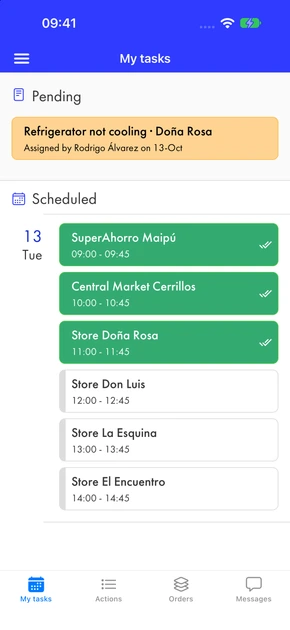
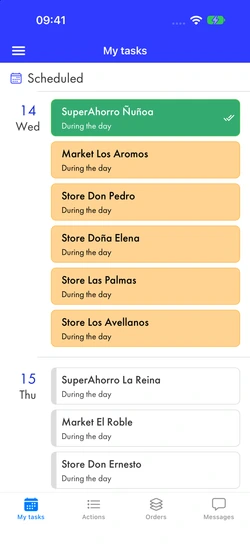
A merchandiser’s tasks: today’s route with six visits, three already submitted
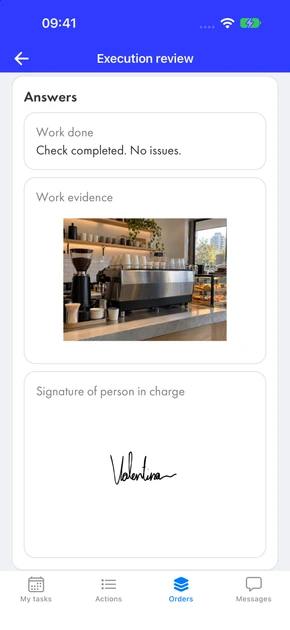
Reviewing a submitted task: work notes, a photo of the café counter as evidence, and the manager’s signature

Running daily operations with Duit

  • Zurich
  • CCU
  • Carozzi
  • Happyland
  • Seguros Falabella

› How it works

From the office to the field, and back with data.

  1. 01

    ›Design

    We turn your procedure into a routine that’s simple to follow. Build it yourself, or we build it and keep it up to date with you, as part of our service.

  2. 02

    ›Assign

    Schedule each activity for a person or a team, with a time and frequency if you need them—like a calendar appointment, only better. Everyone knows exactly what they have to do.

  3. 03

    ›Execute

    Duit guides your team step by step as they work, even without a connection. It’s simple enough that no training is needed.

  4. 04

    ›Record & Report

    Know everything that happens in the field. Use our reports and alerts, or connect your own BI tools.

  5. 05

    ›React

    Use rules or AI to trigger automated actions. Define “what should happen if…”

Routines completed in the field
6 M
People who have used Duit on their phones
5,500+
In operation
7 years

› Use cases

One app, tailored to each operation.

You call the tune. Duit adapts to your methods and style, and gives you the tools to work more efficiently. A few examples:
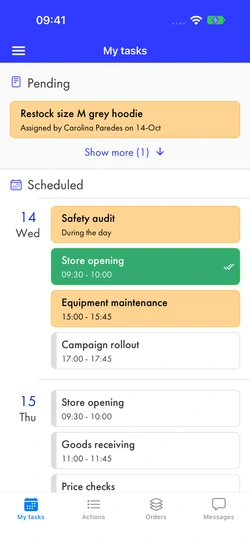
  • A store manager’s tasks over several days: store opening submitted, an all-day safety audit, equipment maintenance, and campaign rollout

    Retail

    Store operations

  • A merchandiser’s route: six store visits today and more tomorrow, all due during the day

    Consumer goods

    In-store execution

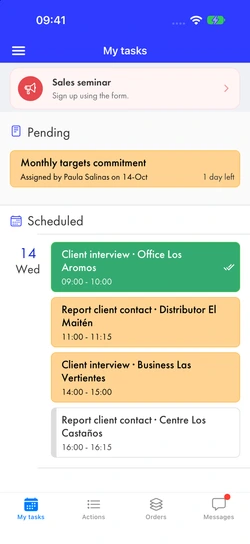
  • A sales rep’s tasks: a sales seminar notice, a pending monthly targets commitment, one-hour client interviews and 15-minute contact reports

    Sales

    Sales follow-up

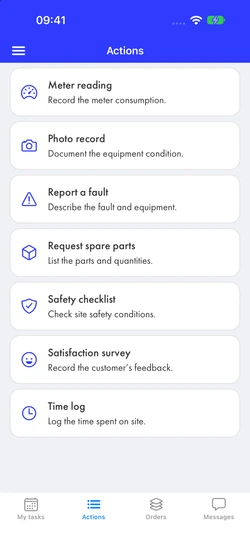
  • A technician’s actions: meter reading, photo record, fault report, spare parts request, safety checklist, satisfaction survey, and time log

    Services

    Maintenance and inspections

› Product

Every step captures exactly the data you need.

More than 25 task types combine to build your work routines. Every inspection, checklist, store walk, or simple order is built from the same pieces. Get your data exactly the way you need it, error-free.

Evidence

  • ›Take a photo
  • ›Upload a photo
  • ›Signature or drawing
  • ›Short or long text

Automatic scanning

  • ›Barcodes and QR codes
  • ›Chilean ID scanning (RUT)
  • ›Read text with the camera (OCR)

Measurement

  • ›Numbers and counts
  • ›Automatic calculations
  • ›Stopwatch
  • ›Date and time

Decisions

  • ›Yes / No
  • ›Single choice
  • ›Multiple choice

Your company’s data

  • ›Tables imported from your systems
  • ›Live lookup in another system
  • ›Assign an owner

Integrations

We send and receive data from your other systems, so nobody wastes time copying it by hand.

Messages

Talk with your field teams inside the same app.

AI

We use AI to complement Duit: interpreting images, triggering actions, and more.

› Product

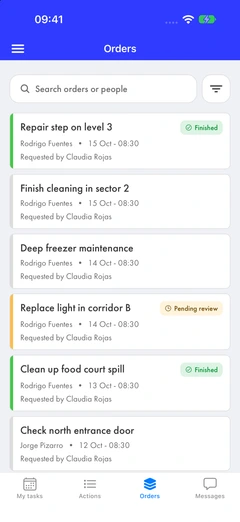
Orders: Nothing asked for is left open.

Handle tasks that come up along the way, easily and with follow-up.

A pending task, a repair or a problem to fix: each one becomes an order that’s tracked until it’s properly done.
›With an owner
Every order has a person in charge and can be delegated without losing track.
›With evidence
The person completing it submits photos, data, and a signature—not just a “done” message in a chat.
›With review
Whoever placed the order approves the work or sends it back with a comment. Everything stays in the history.
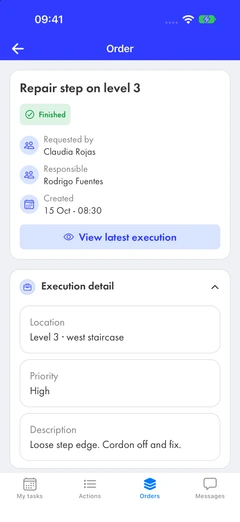
A finished order’s details: who requested it, who is responsible, location, priority, and description

› Security and IT

Your IT team’s questions, answered upfront.

SSO

Corporate sign-in

Connect your identity provider with SAML. Teams sign in with their corporate accounts, with no extra passwords to manage.

Offline

Works offline

Completed routines and photos are saved on the phone and sync automatically when the connection returns. No work is lost when coverage drops.

Data

Your data, in your BI tools

All captured data is stored in a data warehouse that your BI tools can connect to directly, without exporting spreadsheets.

IT

No IT project required

No setup fee or servers to maintain. We configure your routines with you and adapt them over time.

› Pricing

One price per user, with no setup fee.

Our plan

›Zero implementation risk
There are no upfront or setup fees. There is no minimum service term. You can end the service at any time. It pushes us to work harder.
›Ongoing service
We don’t just offer an app. We’re a SWAS—“Software With a Service.” We include user support and advisory hours to update and modify the solution we implemented.
›Urgency
Don’t wait any longer. A solution we tailor to your operation, simple to use, and you only pay once it’s up and running.

US$20

per user per month

20-user minimum · Volume pricing for larger teams

Based in Chile? See pricing in UF

  • ✓Initial setup with our team
  • ✓User support and adjustments as your operations evolve
  • ✓iOS and Android app, plus a web console for supervisors
  • ✓Access to your data from your BI tool

Try us.

Tell us what you’re looking for, or send us your document or checklist, and we’ll show it working in Duit. Then we test it with your team in the field, for free.